Motorola (Acer) T190/T191 Unlock Clip
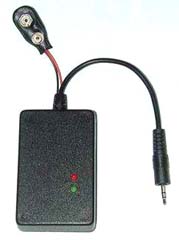
Clip is a connector with special SMD parts inside, which can unlock your phone without computer and software. You don`t need anymore to buy expensive software or to carry laptop with you. Just connect clip to phone, power it on and wait 5 seconds. After phone is unlocked.
Supported phones: Motorola T190 and T191
Supported versions: ALL
Features: remove SimLock (all levels) and Security Code|
Operation Instructions:
Power the Clip with 9V Battery -> green LED lit -> Connect the clip to the turned off Phone -> Press "ON" button in the Phone for short time for ignition -> Red LED lit on and after about 10 seconds the Phone will turn automatically on and the Red LED off -> Phone is unlocked
Printer friendly version
PDF version
Supported phones: Motorola T190 and T191
Supported versions: ALL
Features: remove SimLock (all levels) and Security Code|
Operation Instructions:
Power the Clip with 9V Battery -> green LED lit -> Connect the clip to the turned off Phone -> Press "ON" button in the Phone for short time for ignition -> Red LED lit on and after about 10 seconds the Phone will turn automatically on and the Red LED off -> Phone is unlocked
motorola, unlock, clip, t190, t191, reset, sim-lock, phone, code
Product names used in this web site are for identification purposes only and may be trademarks of their respective owners.
LIKE US ON FACEBOOK!
Each registered
customer gets
2% discount!



partners
GSM Accessories